Why this prediction?
Adjudication, adverse-action notices, and individual-case audits all need explanations for one specific row, not the population average. This page covers the two per-prediction plots.
When to use this
- When an adjudicator opens a case file and needs a single-page explanation of why the model scored this loan, this patient, this transaction.
- When writing the legal-required adverse-action notice that has to cite the top reasons for a decline.
- When stress-testing the model on the highest- and lowest-risk predictions to make sure the explanation reads sensibly at the extremes.
The two views
| Function | Returns | Use for |
|---|---|---|
concept_violin |
Per-concept distribution of row-level SHAP | "How concentrated vs. spread is each concept's contribution?" |
ConceptPredictionExplainer.waterfall |
Single-row contribution cascade | "Why this specific prediction?" |
concept_violin is a population-level summary that prepares you to
read individual rows. waterfall is the actual single-row chart.
Minimal example
from concept_graph_xai import (
    ConceptPredictionExplainer, concept_violin,
)

# Population-level distribution
concept_violin(graph, feature_names, shap_values).show()

# Single-row explanation
explainer = ConceptPredictionExplainer(graph, feature_names,
                                       shap_values,
                                       base_value=expected_value)

# Full-depth waterfall for the highest-risk row
highest_risk_idx = predictions.argmax()
explainer.waterfall(row_idx=highest_risk_idx).show()

# Same row, but capped at depth=2 (the C-suite version)
explainer.waterfall(row_idx=highest_risk_idx, depth=2).show()

# Drill into one branch
explainer.waterfall(row_idx=highest_risk_idx,
                    sub_tree="Behaviour").show()
Reading the output
Violin
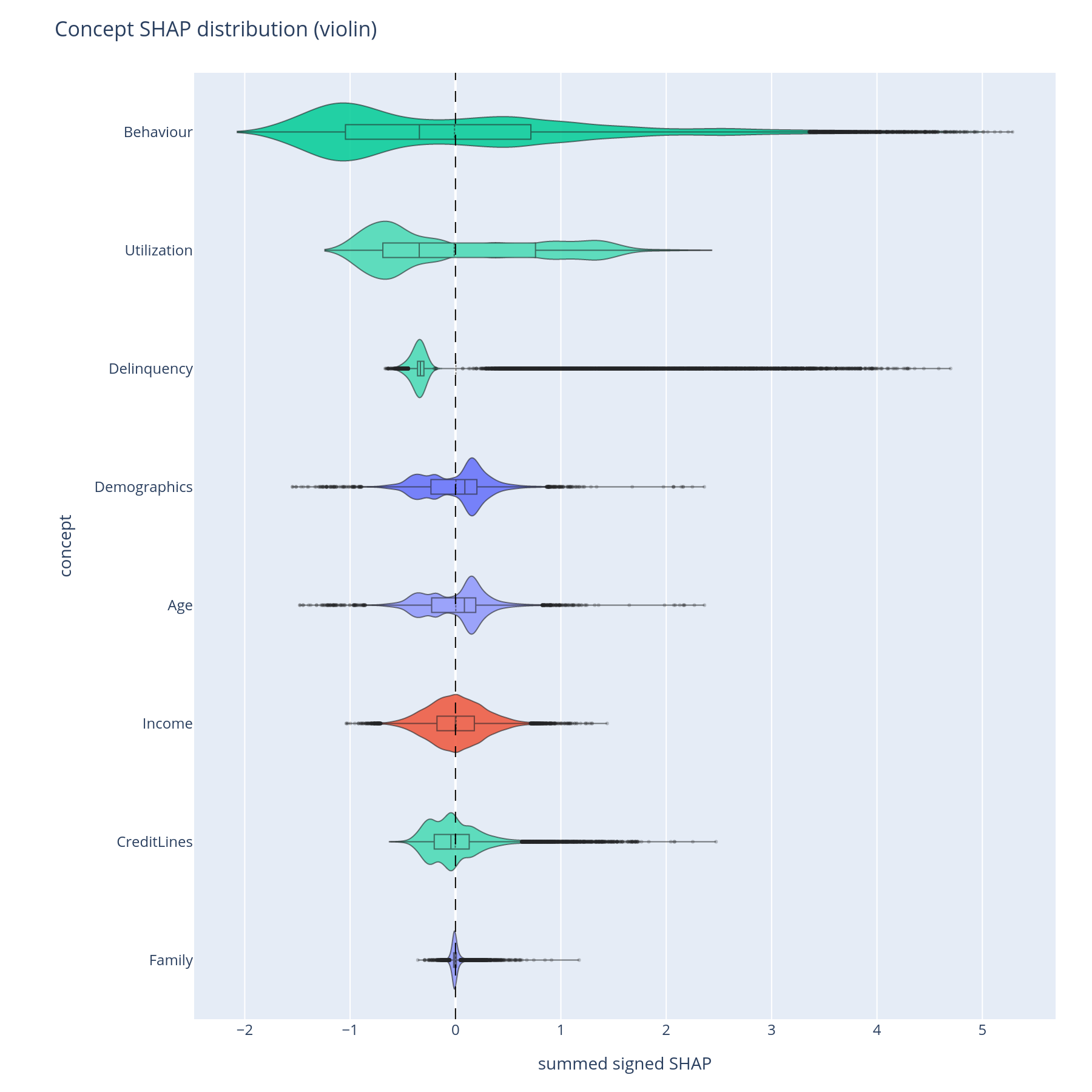
Each violin is one concept; width at a given y-value is the density of rows with that concept-level SHAP contribution. A long thin tail means the concept is normally quiet but occasionally swings the prediction by a lot. A tight cluster around zero means the concept rarely matters at the row level even if its importance_sum is non-zero.
Reading order matters: concepts are sorted by mean|SHAP| (highest first) so the top violin is the dominant population-level contributor.
Waterfall
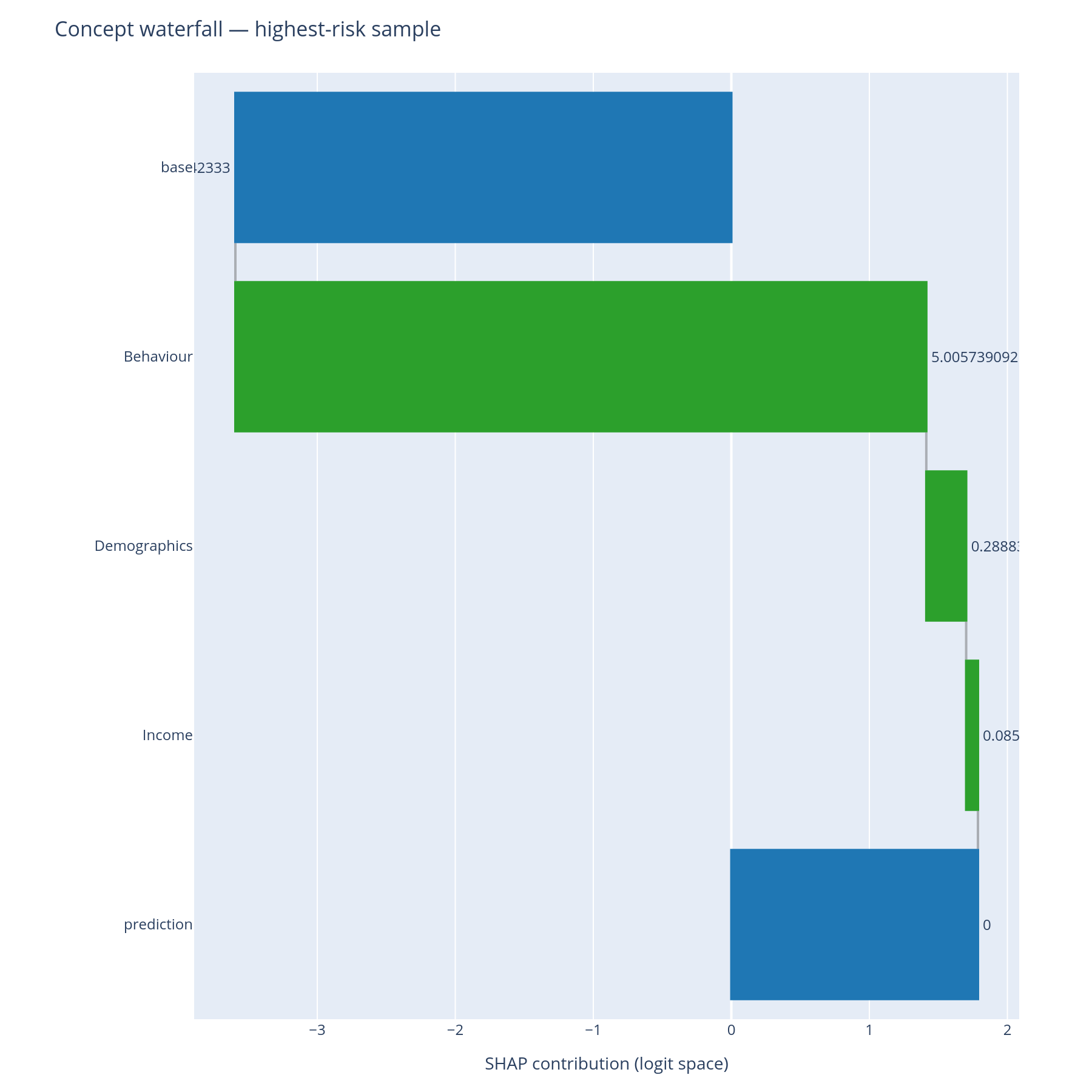
The classic SHAP waterfall, lifted to the concept level:
- Top bar = the model's base value (the expected log-odds before any feature is observed).
- Each bar = one concept's (or feature's) row-level signed contribution.
- Bottom bar = the model's prediction for this row.
depth=None (the default) expands the full tree. depth=2 stops at
the second level — useful when the adjudication audience cares about
Income vs Behaviour but not Behaviour > Delinquency vs Behaviour >
Utilization. sub_tree="X" shows only the cascade under concept X
and is the right call for "explain why Behaviour was the dominant
driver".
The colour convention is the SHAP standard (red = pushes prediction up, blue = pushes down) so the chart drops into any document already using SHAP figures.
What to do with the answer
- Use
depth=2waterfalls in the adjudication packet — they read naturally as a one-paragraph English sentence: "the model declined this loan because Behaviour was the dominant push, with Income partially offsetting". - Use full-depth waterfalls for the regulatory case file where the underlying features must be cited.
- Use
sub_tree=when the reviewer asks a follow-up: "why was Behaviour so dominant?". - Validate the chart on the extreme rows first
(
predictions.argmax(),predictions.argmin()) — if the explanation reads oddly at the extremes, the tree is probably mis-shaped and the concept-design diagnostics will say where.
Common pitfalls
base_valuematters. Pass the sameexpected_valuethat your SHAP explainer returned (e.g.explainer.expected_value). The waterfall is meaningless without it because the base + sum-of-bars identity is what makes SHAP additive.- Row index vs row position.
row_idxis the positional index intoshap_values, not a pandas label. IfXhas a non-default index, useX.index.get_loc(label)to convert. - Categorical features. If your model trained on one-hot encodings, each level appears as a separate feature in the waterfall. Group them in the concept tree by giving the category as a concept and the levels as its features — the waterfall will then collapse them at the concept level.
Related
- Composition — the population-level Sankey from which the row-level waterfall is the per-row slice.
- Cohort — when an explanation looks unusual, the cohort view often reveals it as a segment-specific behaviour rather than a bug.
- Tour, Part D — the same answers in narrative form.