Where does the model behave differently across protected groups?
Fairness review needs a chart that says, for each concept, how differently the model treated group A vs. group B. Per-feature disparity numbers are too granular for the conversation; the disparity heatmap rolls them up to the concept level.
When to use this
- Before any model launch where a protected attribute (sex, race, marital status, age category, …) is in scope of legal or regulatory fairness review.
- During incident response on a fairness complaint, to locate the concept the model treats differently across groups.
- As a periodic monitoring view: re-run on a recent slice and compare against the launch baseline.
The view
| Function | Returns | Use for |
|---|---|---|
concept_disparity + concept_disparity_heatmap |
Long-form (concept, group-pair) → signed disparity | "Which concepts does the model lean on more heavily for group A than for group B?" |
Minimal example
from concept_graph_xai import (
    concept_disparity, concept_disparity_heatmap,
)

# A protected-attribute column on X, or a separately built Series.
# Any number of groups is supported; the disparity is computed
# pair-wise.
disp = concept_disparity(graph, feature_names, shap_values,
                         protected="senior_flag", X=X)

concept_disparity_heatmap(disp).show()
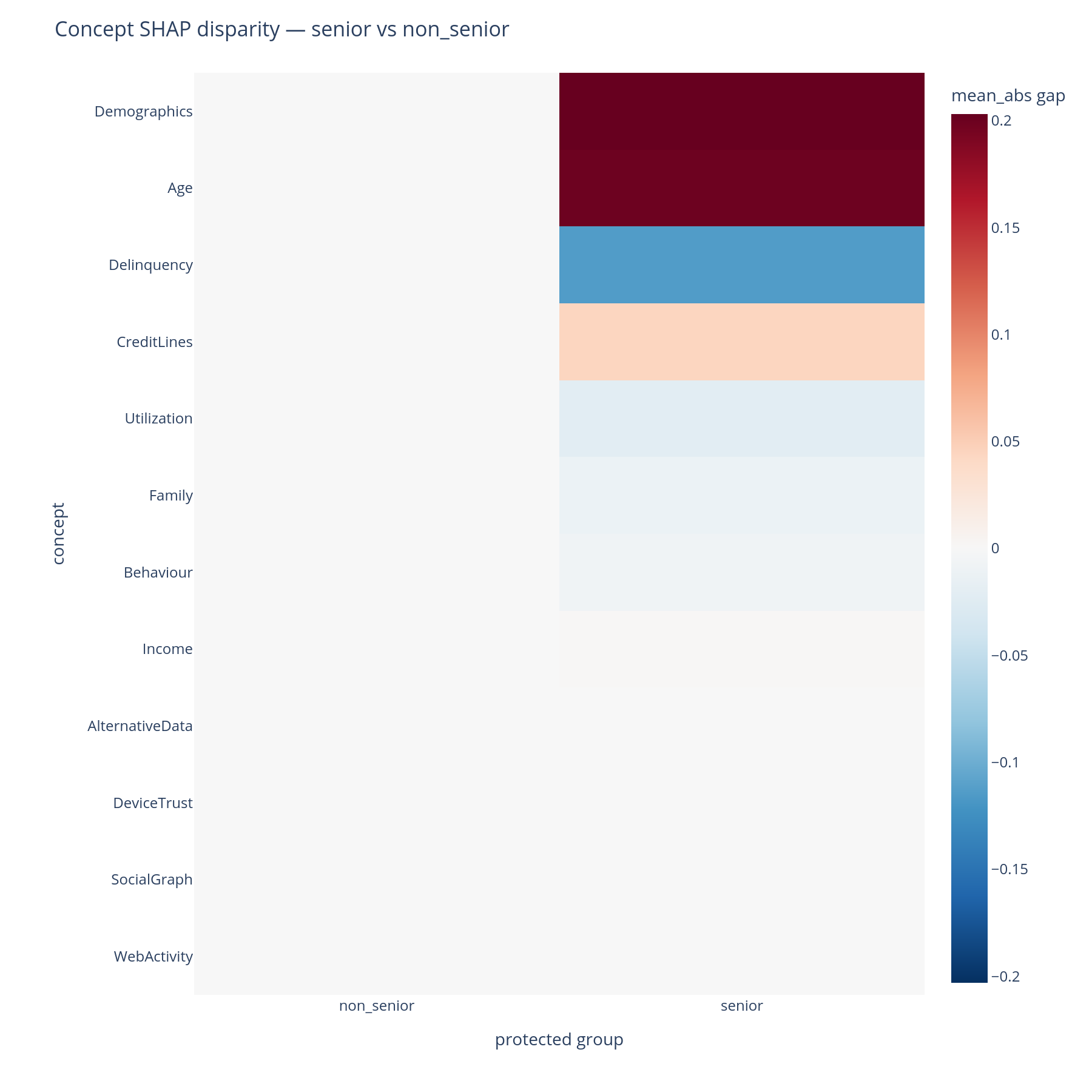
Reading the output
Rows are concepts (DFS preorder). Columns are pairs of protected
groups, formatted "<group_a> - <group_b>". Cell colour encodes
signed disparity (a diverging red↔blue palette centred at zero):
- A red cell means
group_areceived a larger mean|SHAP| contribution from this concept thangroup_b. - A blue cell means the reverse.
- A white cell means the model contributed comparably from this concept across the two groups.
The magnitude is in the same units as mean(|SHAP|). The palette
limits are set to the symmetric maximum of |disparity| across the
matrix so the colour scale is comparable between cells.
By default the heatmap shows all unordered pairs of groups (C(K,
2) columns for K groups). For just-vs-rest, set the protected
column to a binary categorical before calling.
What to do with the answer
- Investigate the largest-magnitude cells first. The disparity says the model treats these groups differently in this concept — the next question is why, which the cohort view, per-prediction waterfalls, and (often) an upstream-data audit can answer.
- Distinguish legitimate vs unjustified disparities with legal / business / domain context. The heatmap surfaces; it does not adjudicate. A disparity in Income across age groups is usually legitimate; a disparity in Demographics may not be.
- Pair with the cohort view on the same segments defined as protected groups. If the same concept lights up in both views, the model is consistently group-differential there; if only one view lights up, the difference may be a statistical artefact of cell sizes.
- Carry the flagged concepts into the tree-design review: a kitchen-sink concept that also shows large disparity is the highest-priority concept to split.
Common pitfalls
- Tiny cells. Groups with few rows produce mean|SHAP| estimates
with high variance — the disparity will look large even when the
underlying difference is sample noise. Inspect
X.groupby(protected_col).size()before reading. - Direction confusion. The column ordering is
"<a> - <b>". If your protected column is{"senior", "non_senior"}and the resulting column reads"senior - non_senior", a red cell means more contribution for seniors. The library uses first-seen order for plain object dtypes; set apd.CategoricalDtypewith explicit category order for deterministic output. - Multi-group blow-up. With many groups, the heatmap can grow to
C(K,
2)
columns and become unreadable. For >5 groups, slice the output to the group-pairs that matter or set a binaryversus-restflag before calling.
Related
concept_disparity,concept_disparity_heatmap— API reference.- Cohort — same plot shape, legitimate-business-segment framing.
- Per-prediction — single-row waterfalls to investigate a flagged concept on individual cases.
- Tour, Part G — the same answers in narrative form.